I was working with different textures,,,,,,but not as the usual way,,,,,,,,,,,you can use these textures to give your cards a curious and amazing look,,,,,,(take my sampler cards). Now I´ll teach you a GORGEUS TIP TO USE B/W TEXT ON YOUR CARDS .It is curious,,,,,,I have receiving lot of questions about how to use the usual black text on books to post it on dark cards,,,,so it is necessary to get this TEXT in the opposite way.
HERE IS THE TIPS AND TRICKS TO USE YOUR FAVORITE TEXT FROM BOOKS:
1) Open yout favorite page,,,from a vintage book,,,,so I assumje you have a BLACK TYPE ON A CREAM OR WHITE SHEET.
1) Open yout favorite page,,,from a vintage book,,,,so I assumje you have a BLACK TYPE ON A CREAM OR WHITE SHEET.
2) Don´t worry,,,,,,select the page and copy /paste to a new layer/file.
3) Choose your page layer and now aply DESATURATE so you can be sure now your text is on black and white colors now,,,,,,,,perhaps you need adjust levels if necessary.
4) The TIPS IS HERE------------All you need now is Select All and Invert.......So you have a Black sheet and your type is now White............
5) To place The complete text on your Back all you need is change the BLENDING MODE TO SCREEN .and this all,,,,,,,,,,,,wowwwwwww.........


My ATC Background sampler using the previous Techniques

This Technique can be used on drawings,,,,so you can get gorgeus effects.
My new Happy Hollisters Book Cover

Textures are a big resource for Designers,,,,,,I used my new Leather Textures on my previous background cards to show you tips and tricks using White text.....................
Leather Textures (to used as backs and apply Text Effects)

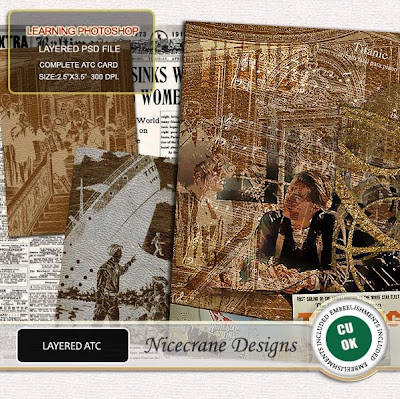
Vintage Titanic Card

A Closer Look of my Backgrounds....


Famous Moments CS (Titanic)

FROM MY STORE HERE
Don´t forget you can check all my products by downloading your
FREEBIES HERE:
 DOWNLOAD YOUR FREEBIE
HERE. PASS:291162

EXPIRED LINK
Don´t forget you can check all my products by downloading your
FREEBIES HERE:
 DOWNLOAD YOUR FREEBIE
HERE. PASS:291162

EXPIRED LINK




 Posts
Posts


